What Are Proofreading Marks? A Beginner’s Guide


Contents
If you’re considering a career as a proofreader or editor, you should be aware of proofreading marks. Although most proofreading and editing is now done via a computer in a program like Microsoft Word, you may need to use proofreading marks if a client wants you to work on paper.
In this blog post, we answer the following:
- What are proofreading marks?
- How are proofreading marks used?
- Are proofreading marks still used today?
We also provide a free proofreading marks chart that you can use to get familiar with some of the most common marks.
Let’s take a look.
What Are Proofreading Marks?
Proofreading marks (also known as “proofreader’s marks”) are used by proofreaders and editors when working on a hard-copy, or printed, document.
When you’re proofreading on paper, you can’t edit the text directly – all you can do is mark up the document to show the author what needs correcting and where. Proofreaders and editors use these marks to flag spelling, punctuation, and grammar errors, and sometimes formatting issues too, such as inconsistent spacing or a heading in the wrong style.
While there are standardized systems for proofreading marks (more on those below), they’re not fixed in stone. Some editors develop their own shorthand or special characters for particular corrections, especially if they’re working consistently within one publishing house or with the same author over time. If you come across a mark that looks unfamiliar, it’s always worth checking with the person you’re working with rather than guessing at what it means.
Whether you’re marking up a printed manuscript, a typeset proof, or a student’s assignment, the goal is always the same: to communicate corrections clearly without altering the text yourself.
How Proofreading Marks Are Used
Proofreading marks work as a two-part system: a symbol placed directly within the text to show exactly where the error occurs, paired with a corresponding instruction or abbreviation written in the margin. The inline symbol tells you where to look; the margin note tells you what to do about it.
This is how to apply a mark correctly:
- Find the error and place the relevant symbol directly on or beside it in the text.
- Write the matching instruction or abbreviation in the nearest margin, level with the line containing the error.
- If a line has corrections in more than one place, work outward. Corrections for the first half of the line go in the left margin, and corrections for the second half go in the right margin. This keeps multiple edits on the same line easy to follow.
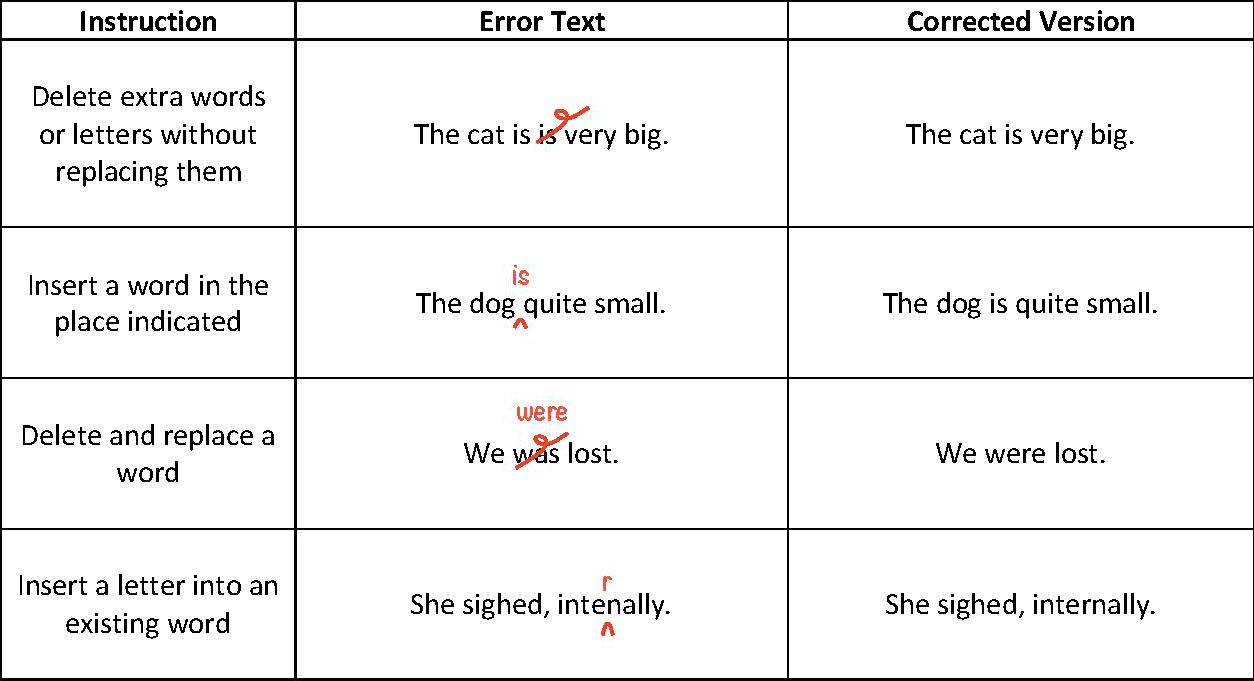
For example, take the sentence “The cat is is very big.” You’d strike through the second “is” inline, using a loop or delete mark, to show it should be removed.
For an insertion, such as adding “is” to “The dog quite small,” you’d mark a caret (^) at the point it’s missing and write the word above it.
There are two marks that come up often enough to call out on their own:
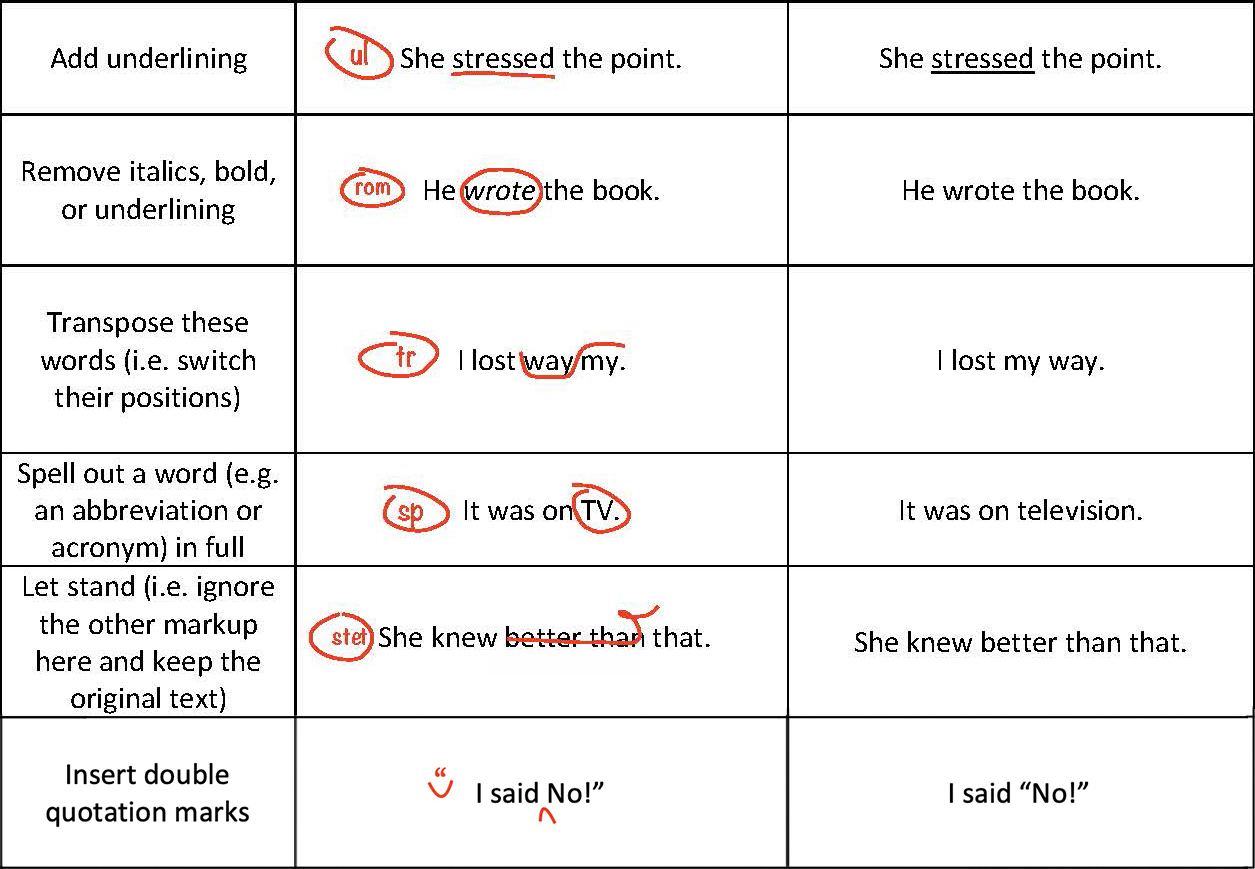
- Transpose (tr): A curved line connects two elements in the text that need to swap places, with “tr” written in the margin.
- Stet: If an editor wants to reject a previous correction and keep the original text, they place a row of dots under the crossed-out text and write “stet” (Latin for “let it stand”) in the margin.
Whichever marks you use, keep them consistent throughout a document, and make sure they’re legible enough that the author won’t have to guess what you meant.
Are Proofreading Marks Still Used Today?
The short answer is yes – but far less often than they used to be, and mostly in specific contexts.
Traditional proofreading marks are still taught by professional bodies such as the Chartered Institute of Editing and Proofreading and the Institute of Publishing (formerly the Publishing Training Centre). They also remain standardized in reference works like the Chicago Manual of Style (18th edition) and British Standard 5261C. They’re far from obsolete, and are still a recognized industry convention.
In practice, they show up most in print-based workflows. Proofreaders still mark up printed proofs by hand before a book goes to press, so if you’re aiming to work in traditional book publishing, they’re genuinely worth learning. You might also need them as a freelancer if a client prefers feedback on hard copy or a typeset text.
There’s a practical argument too. Some proofreaders find they detect more errors when working from a printout, though the research on this is mixed.
That said, most proofreading now happens on a computer rather than on paper. Track Changes in Microsoft Word, Google Docs’ suggestion mode, and PDF annotation tools have replaced handwritten marks for most day-to-day work. A 2021 survey of Canadian editors found that 84% of proofreaders now work on-screen, compared to just 16% on paper. The upside is that the underlying concepts carry across. Deletion, insertion, and transposition mean the same thing whether you’re marking a printed page or clicking through suggested edits, so learning one system gives you a head start on the other.
Common Proofreading Symbols and Marks
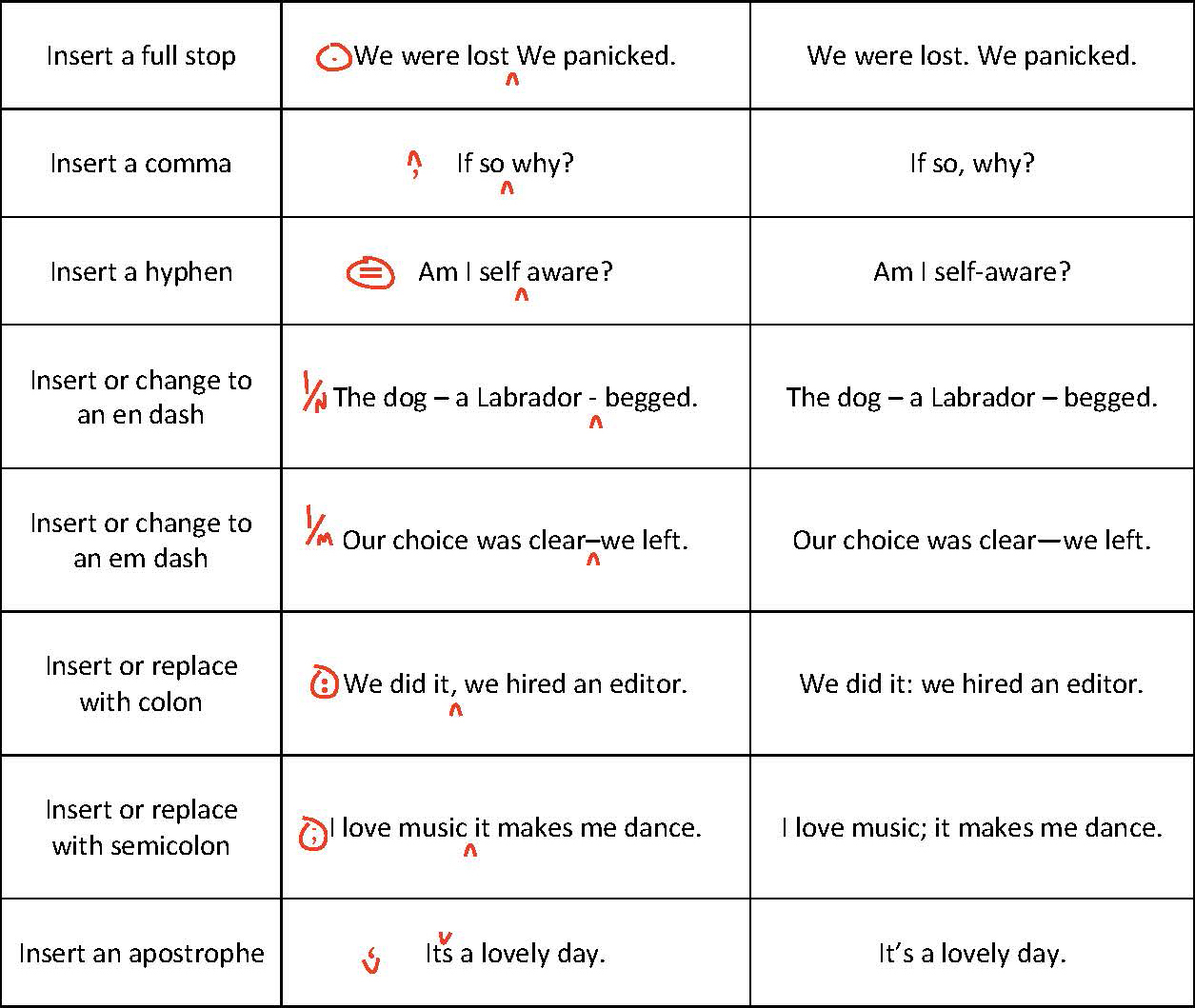
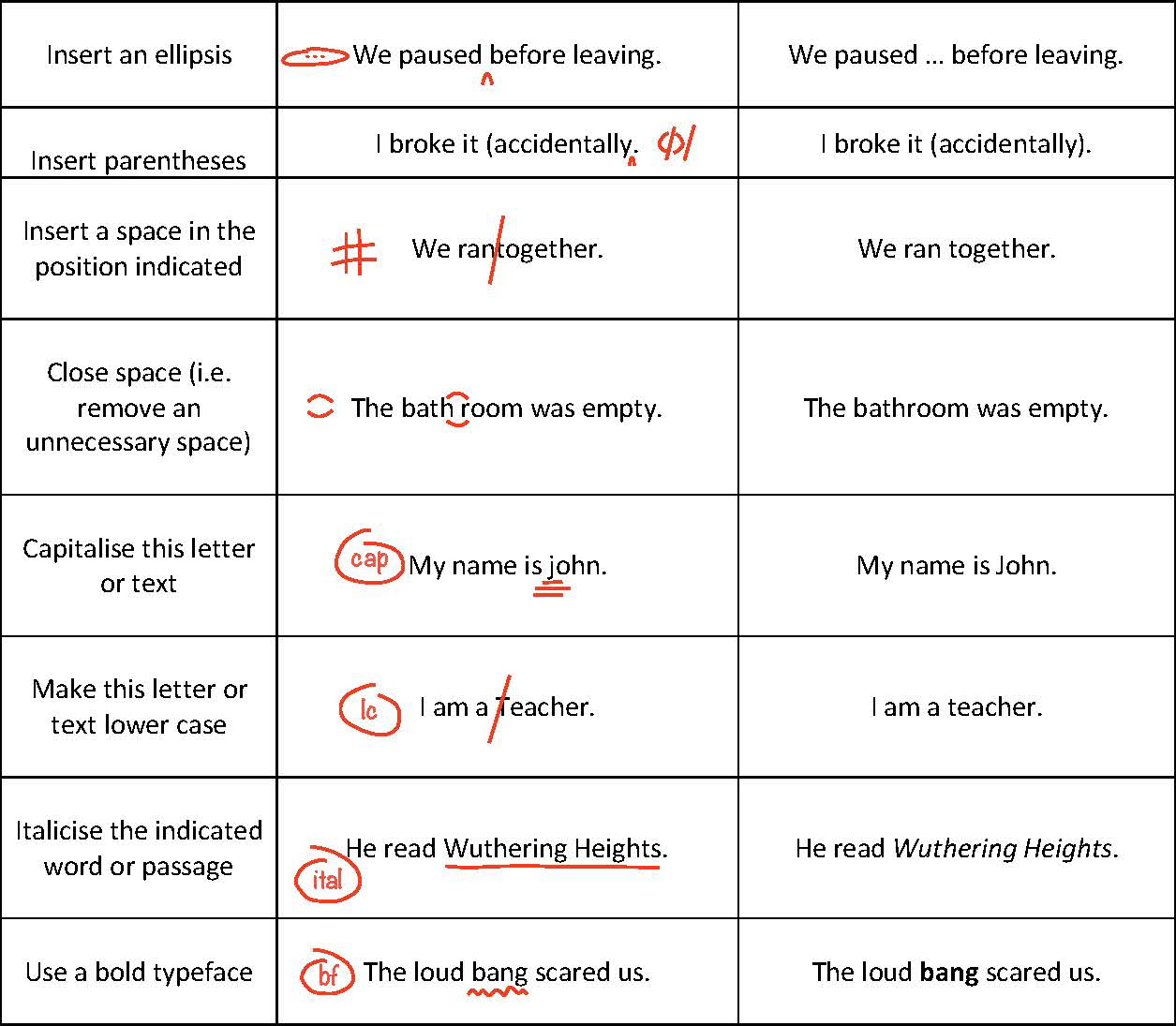
Below, we’ve put together a chart of some of the most common proofreading symbols and marks, along with examples of how to use them in a manuscript.
Here are a few you’ll come across most often:
- The caret (^) marks where text needs to be inserted.
- A strikethrough or delete loop shows a deletion.
- “Stet” tells the author to ignore a correction and keep the original wording.
The chart also covers marks for spacing and punctuation – for example, how to close up a gap, insert a hyphen or dash, or correct a comma – so you have a single reference for the marks you’re most likely to need day to day.
Think of it as a proofreading marks cheat sheet: Keep it open while you’re working through a hard-copy edit, or print it out and keep it beside your desk for quick reference. You don’t need to memorize every symbol before you start. Most proofreaders pick them up through repetition, referring back to a chart like this one until the common marks become second nature.
Becoming a Professional Proofreader and Editor
Want to learn more about modern proofreading and editing? Check out our Becoming A Proofreader and Becoming An Editor courses. They cover everything you need to know to proofread and edit documents in Microsoft Word and other digital formats (such as PDFs, LaTeX, Excel, and HTML).
Buy both courses together as a bundle and you’ll save 15% compared to buying them separately.
Score a distinction in both final assignments, and you’ll gain access to paid proofreading work with Proofed!







Your email address will not be published.